 Dorris
The Dorris kit: build it yourself
The do-it-yourself version: a starter app and nine lessons to set it up and grow it with an AI agent.
- Free
Want us to build it for you instead? Book a demo.
The kit is the do-it-yourself version: the same starting app and the lessons, for you to set up on your own computer and grow with an AI agent.
Dorris is a starter kit and course for Shopify store owners who don't code. You get a support inbox on day one, with each customer's order beside their email, and as shipped it only reads your store and changes nothing in it. Then you tell an AI agent what else you need. The kit is $249, paid once, with a 14-day no-questions refund. You pay for your own AI plan separately.
Dorris is software first: an app on your own computer, under your own accounts. Nine lessons walk you through setting it up and growing it, and the first is free.
I'm Tim. I run a tent company, I don't code, and since April my business has run on software I directed an AI to build, one request at a time. Call yours whatever you like.
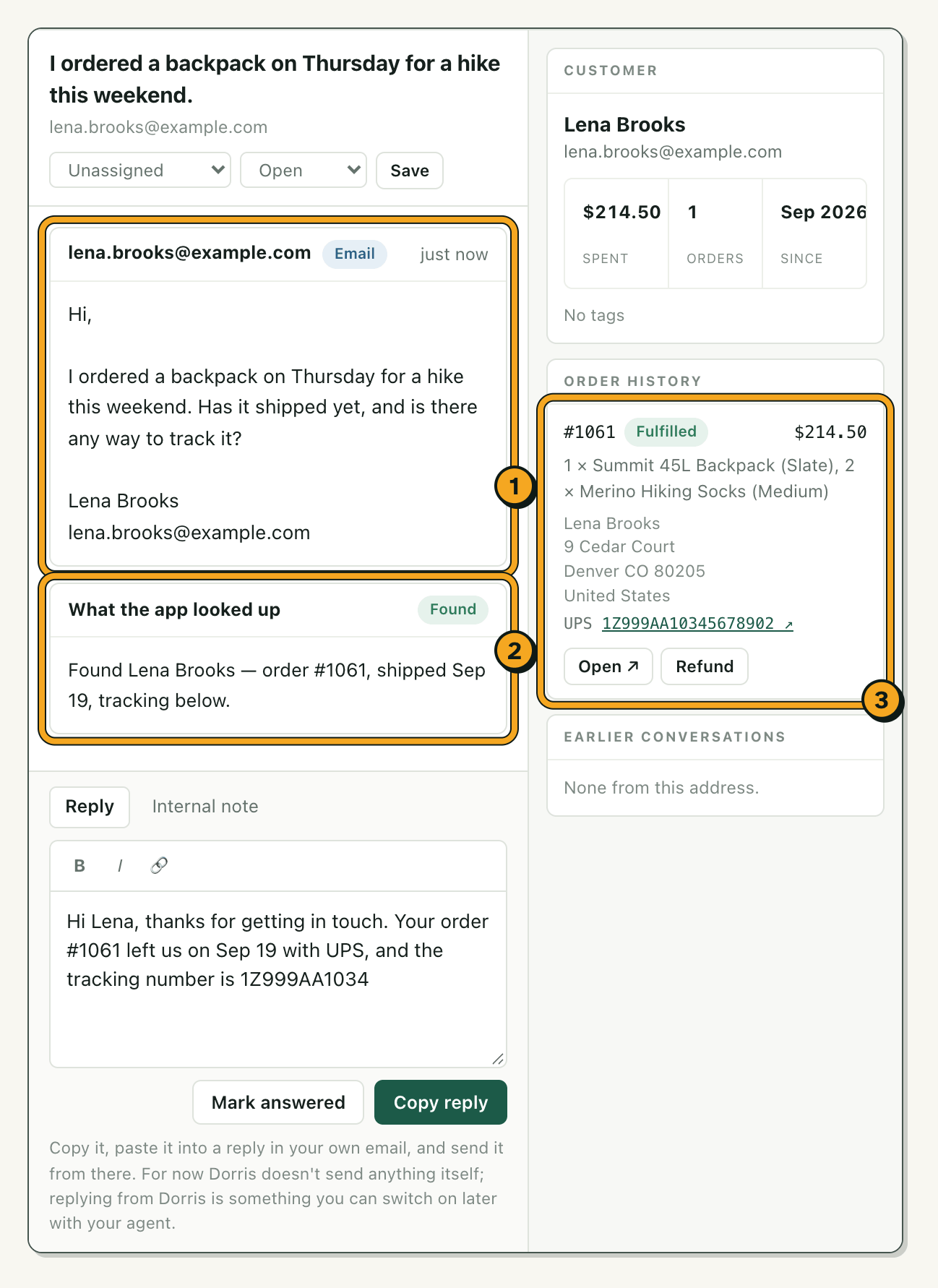
A customer asks whether her backpack has shipped (1). The app has already found her order (2) and put it beside her email, with tracking (3). You write the reply, copy it and send it from your own email.
Here it found her from her email address alone, and shows her name and address: both need a higher Shopify plan. On any plan, it finds an order from the last 60 days by a number like #1061 in the email (older ones too, where Shopify allows it).
How the kit works
Install it
On your Mac or Windows computer, full of made-up messages. Nothing real to break.
Connect your Shopify store
Your AI walks you through it. Your store lets the app read, nothing more.
See your real orders
Type an order number, and your own order opens beside a practice message.
Connect your email
New emails arrive beside their orders while the app is open. That's setup done.
Make it yours
Say what you want in plain English. The AI builds it, and its instructions tell it to stop so you can check.
Step 3 is the first real test: one of your own orders, on your own screen. The 14-day refund runs from the day you buy, and you don't need a reason.
The AI is a chat on your computer, on your own paid plan; the lessons use Claude. You don't write code. As it comes, the AI isn't inside the app, and nothing in your inbox writes to a customer. Changing orders is yours to switch on later: a write permission you grant in Shopify, and a confirm step before anything changes. So is sending replies, which takes an email-sending account.
Who the kit fits
You answer customer emails with Shopify open in another tab
Here the order is already beside the email.
You pay every month for apps that do half the job
Ask for the one you want instead.
You're about to train someone on support
Your answers, drafted from your own past replies, written down once for them to look up.
You already type to an AI at work
Here it builds your tools on your own paid AI plan, then stops so you can check.
Switched on today: your Shopify orders and one support mailbox. Your team shares one owner password, at your computer or, once the app is online, each from their own. eBay, Etsy, Amazon or Instagram messages, separate logins, replies sent from the app: each is yours to add later with your AI. A marketplace takes its own access, sending takes an email-sending account, and your AI tells you what before it starts. If you write software for a living, you'd be paying for lessons you'd skip.
Seven questions, about a minute · Every reason to keep your money
Getting the kit set up, and looking after it
Setup takes under an hour: installing to a working, branded inbox took me 25 minutes on my last run. Adding the other tools you want takes longer, one at a time. If you get stuck setting it up, write to me and I'll help you get it running.
After setup there's no help desk and nobody on call. What you have instead:
Your shop keeps selling
The app only reads your store and inbox. If it stops, orders, checkout and email carry on.
It checks its own connections
Its Setup page shows what's connected and what isn't, with a line to paste to your AI.
The usual problems are written down
A free page lists 14 of them and what to paste for each. Read it before you buy.
People you already use can work on it
Your staff, or a freelancer you trust, may change it for your business.
Found a bug, or want something better? Tell your AI in plain English, then check the fix.
What if the kit breaks?
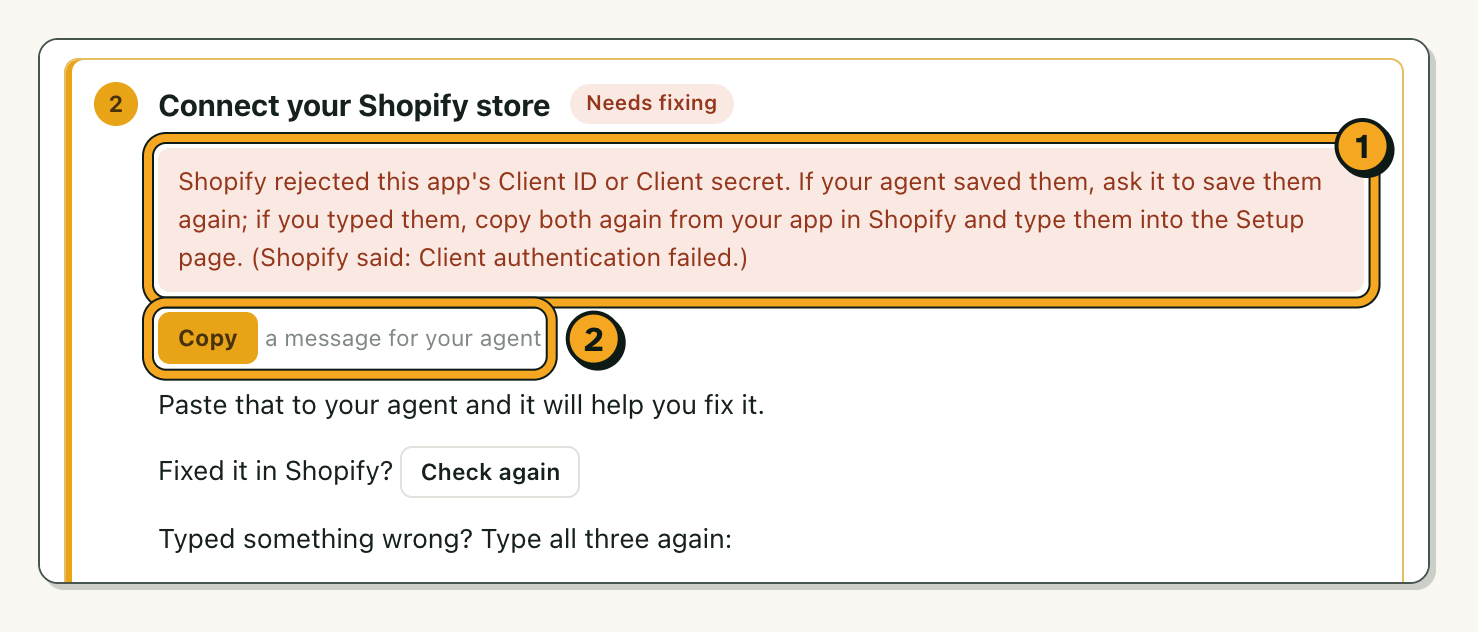
When something fails, the app says so in plain English and hands you a message to copy to your AI, instead of quietly showing something wrong. This is the setup page of the demo shop, with made-up data, when the store says no:
If setup gets stuck
Write to me on the contact page. My AI team reads it first, and I step in to help you get it running, by email. There's no promised reply time and no phone line.
If it still isn't for you
Ask for your money back within 14 days. No reason needed, and nobody will talk you out of it.
If it stops working later
Your shop keeps selling: the app only reads your store and inbox, so orders, checkout and email carry on without it.
If you hit a known problem
The usual ones are written down with what to paste to your AI for each. Read the list before you buy.
After setup there's no help desk and nobody on call: you fix and change it with your AI, and that is the deal.
Kit price and refund
$249
The kit, once: $249 plus any sales tax or VAT where you live, with a 14-day no-questions refund. No per-seat or per-ticket fees.
Your AI plan, monthly: from $20 a month, from day one, to set up, change and fix the app. In a month when you change nothing, you can drop it, and the app keeps running.
Hosting, only once you want the app online with your laptop shut: from about $13 a month.
All told, under $150 a month in most cases, on top of your Shopify plan. Every cost, checked by hand
You get the app, 9 lessons (the first is free), the Field Manual and the Library: what's there today, plus anything I add while your key works. Help from me by email if setup gets stuck. No roadmap, no promised updates.
Terms · How refunds work · Already bought? Install Dorris
Kit questions
Is it software or a course?
Software first. The 9 lessons are the steps for setting the kit up and growing it, read as you go.
Does it have to be Claude? I already pay for ChatGPT.
The lessons are written for Claude, and Claude is the only one we've tried them with. Another AI may work, but we haven't tested it.
What if I get stuck?
Write to me on the contact page and I'll help you get it set up. After that, you change and fix it with your AI; the app shows what's connected and what isn't, and Something broke lists the usual problems and what to paste for each.
What happens to my customers' data?
With the kit, it stays on your computer, or on your web host once the app is online. Nothing in the kit's app reports back to me. What your AI reads in the app's folder, or what you paste into it, goes to the AI company.
The story of how it grew, and what it replaced for us: why we built it.
Tim Haines
P.S. I still don't know how to code.