 Dorris
What you need, and what it costs
Every requirement, price, plan name and version in one place, checked by hand on the date at the top.
- Free
Checked
2026-10-10
Having it built? You pay these two each month, and nothing to us: your Claude plan and your hosting. Book a demo to see it first.
Doing it yourself? The kit is $249, paid once, with a 14-day refund. Everything below is money you pay other companies, in US dollars.
This is the page with the prices, plan names and versions of what you pay other companies. Every line was checked against the vendors' own pages, listed at the bottom. The date at the top is the latest check, and only some lines were done that day: on October 10, 2026 we re-read the Claude plan prices, Render's workspace, web service and database prices, Shopify's Basic and Grow prices, and the model ids and their API rates. The rest was last checked between September 21 and 24, as each section says.
Deciding whether it's worth it? Renting or owning compares a paid app with software you own, and how we replaced our app stack is the story behind it.
Before you start
A computer: Mac, Windows or Linux. What you build is a web app that runs on your computer first, then on a cloud server. The Claude desktop app is for Mac and Windows only; on Linux you'd use the version of Claude that runs in a terminal. Every step here was written and run on a Mac. Windows has its own signed installer.
The app to install first: the Claude desktop app. Download it from Anthropic and sign in. Everything else here, and the kit's first message, assumes you have it. It is the Code tab inside it that does the building.
A paid Claude plan. Claude Code is the coding agent that builds this alongside you, and it comes with the Pro, Max, Team and Enterprise plans; the free plan doesn't include it. Pro, the cheap one, will hit a usage limit partway through a real build evening: a rolling five-hour window and a weekly one, shared across the website, the desktop app and the coding agent. Anthropic doesn't publish the numbers; the meter is in your Claude account settings. Something broke says what to do when you hit it.
Which model to use. Your coding agent lets you pick the model, and the middle one, the Sonnet family, handles everything in this course, and costs about half as much per token as Opus (see the table further down). The most powerful, the Opus family, is stronger and spends your allowance faster; switch to it when the agent is stuck or you're planning something big, then switch back. (The model ids further down are only for the optional drafting tool.)
Node. Node is the program that runs the app on your machine. You don't install it in advance: on a Mac, the kit's installer fetches its own copy, and with the zip, the first-run prompt has the kit fetch its own copy too, falling back to walking you through it only if that doesn't work.
A Shopify store you can create an app in. More below: it's the requirement most likely to surprise you.
Opening your agent in the Dorris App folder
Step 2 of your app's Setup page asks you to open your AI agent in the kit's folder. It's in
your home folder, named Dorris App, with a space in it: quote the whole name if you ever
type its path by hand, rather than copying it. On a Mac, Finder's Go menu → Home
shows it. On Windows, your home folder is the one with your name on it under C:\Users.
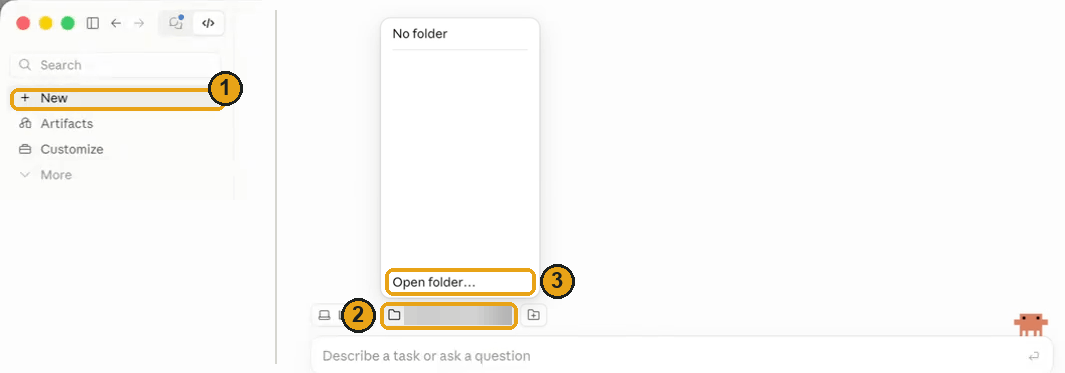
In the Claude desktop app, as it was on September 25, 2026:
1. New, then the folder button. Go to Code and press New (1 in the picture). Under the message box, a folder button shows the last folder you used (2). Press it, then Open folder… (3).
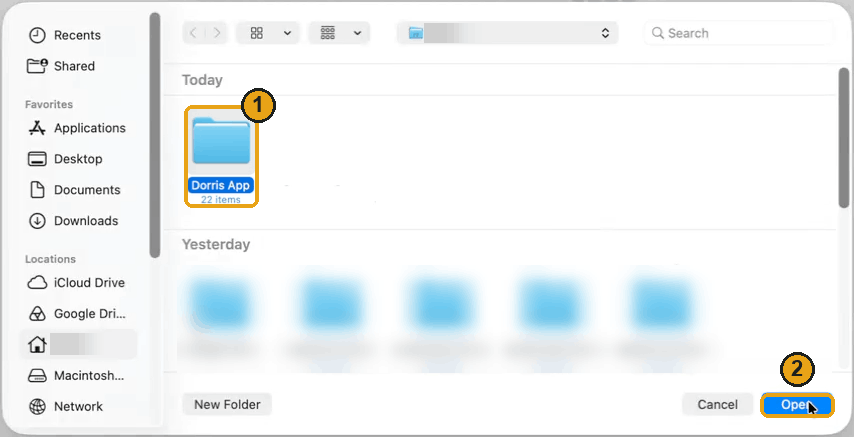
2. Choose Dorris App. Your Mac's folder picker opens at your home folder. Choose Dorris App (1) and press Open (2). Not there? Press Copy beside the folder's address on the Setup page first; in the picker press Command-Shift-G, paste, and press Return. On Windows, paste it into the picker's address bar and press Enter.
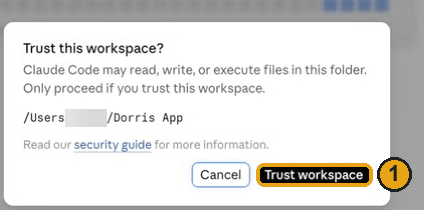
3. Trust it. The first time, Claude asks whether to trust the folder. Press Trust workspace (1): it's your own folder, on your own computer.
What else setup needs from the desktop app, as it was on September 25, 2026:
-
Use Code, not Chat. Code runs commands on your computer, and setup needs that. Chat doesn't see or run anything there, so a setup message pasted into it goes nowhere.
-
No connector or add-on. Nothing has to be switched on first.
-
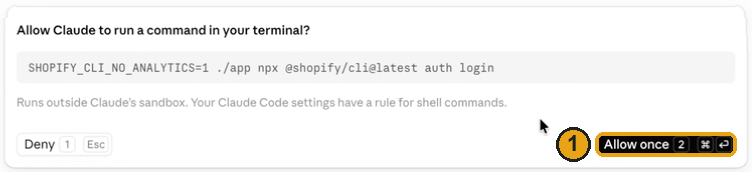
Allow once, after reading it. Before your agent runs some commands, Claude shows the command and asks. Read it, then press Allow once (1).
-
The Terminal panel, for questions answered with the arrow keys. A few Shopify commands, such as picking which account or organization owns your store, need the arrow keys. Your agent runs them in a Terminal panel beside the chat, in a tab named for the job, and tells you which key to press: the arrows move, Enter chooses (1). You can open the panel yourself from the Views menu, or with Control and the backtick key,
Ctrl+`, on a Mac too.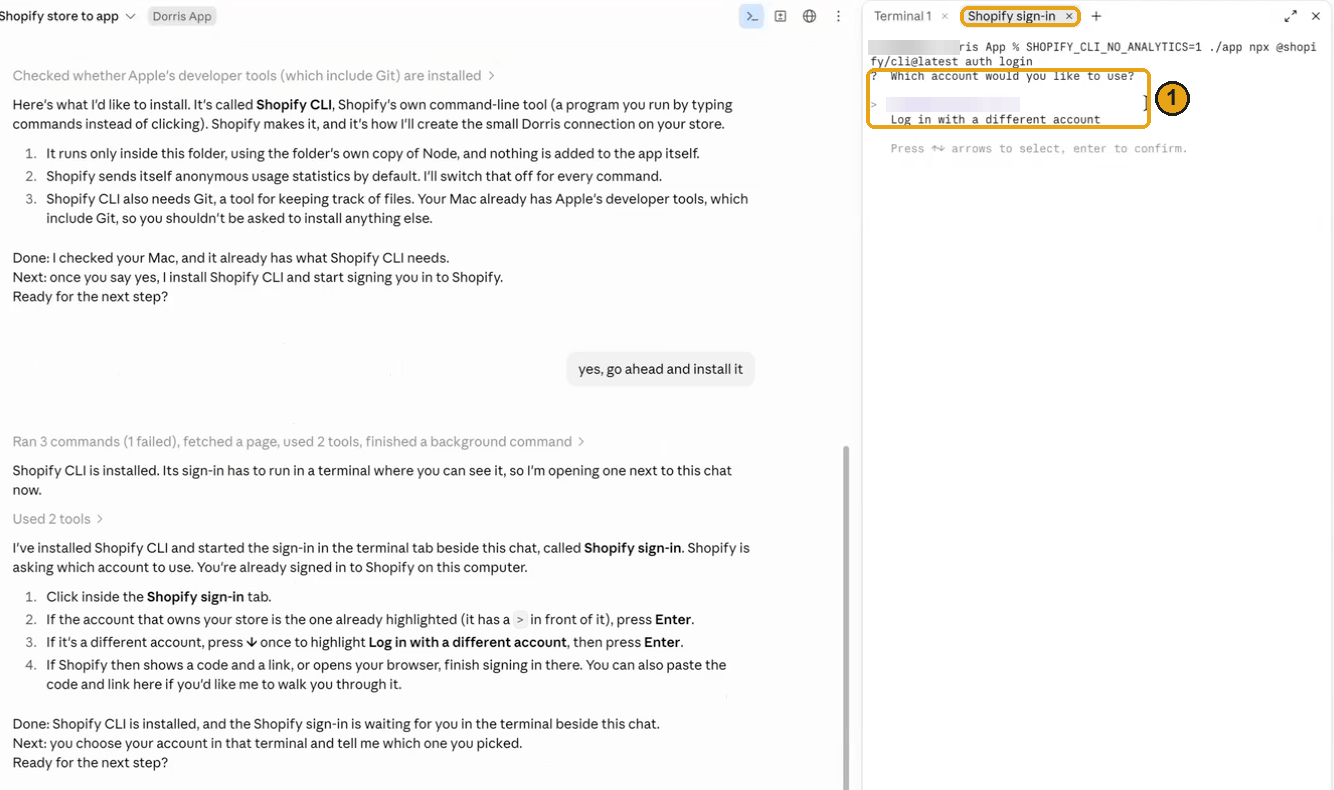
-
No Desktop Commander. It's a third-party add-on that lets Chat run commands; Code does that already. Don't install add-ons your agent did not ask for.
If your screens look different, ask Claude to walk you through opening a folder in Code, one step at a time.
What your email provider asks
Checked on September 24, 2026. Step 4 of your app's Setup page connects one mailbox for the app to read, and your email provider sets what that takes. Usually it's an app password (a separate password for one app, which Google, for one, lets you make only once two-step verification is on), or approving the app's access through the provider, because some no longer let an app in with a password at all: Microsoft 365 business mailboxes don't, and personal Outlook.com ones appear not to either. A work or school account may need its administrator's OK. Your agent checks your provider's current documentation and tells you which applies. An app password goes into the form in step 4, never into a chat.
What it costs to run
Two meters to begin with: the agent, from $20 a month, and hosting, from about $13 a month once the app is online. A third, for AI credit, only if you want it later.
The agent subscription
The course shows Claude. If you already pay for another AI agent, you may not need this plan, but we've only tried the lessons with Claude.
| plan | a month | what you get |
|---|---|---|
| Pro | $20 | the cheapest plan with the coding agent. $17 a month if you pay annually, $200 up front |
| Max 5x | $100 | five times Pro's usage |
| Max 20x | $200 | twenty times Pro's usage |
Those are Anthropic's prices for the US, before tax. Other countries pay in local currency, and subscribing through the phone app can cost a different amount.
Start low: the agent tells you when you've run out. I directed the whole build on Max at $100 a month, the plan counted in the figure on the home page. I pay for a bigger one now for other work, not because this app needs it.
Hosting, once you put it online
Nothing until you get there: this bill starts at the lesson where you put the app online.
The kit's blueprint is written for Render, so these are Render's numbers. Another host is fine; put it online says what to look for. Render bills a flat monthly workspace fee plus compute, a monthly price per service charged by the second. So "$25/mo + compute" on Render's pricing page means the $25 fee plus a charge for each service. The kit runs two, a web service and a database, both on Render's smallest paid sizes.
| Plan | Hobby | Pro |
|---|---|---|
| the workspace plan | $0 | $25 |
web service, 0.5c-512mb (512 MB of memory) |
$7 | $7 |
database, 0.1c-256mb (256 MB of memory) |
$6 | $6 |
| database storage, 30 cents per GB (the kit asks for 1 GB) | about 30 cents | about 30 cents |
| a month, about | $13 | $38 |
Database size can grow but never shrink. The kit's blueprint asks for 1 GB, plenty to start; without it, Render would make a 15 GB database, about $4.50 a month. Bandwidth is metered too, but each plan includes some (5 GB a month on Hobby, 25 GB on Pro), more than a handful of users need.
I'd start on Pro: about $38 total for the kit's setup, and it stays around there unless you're doing really heavy stuff. The $25 gets your teammates their own logins (Hobby has one seat), database restore to any moment in the last 7 days instead of 3, and logs kept for 14 days instead of 7. Hobby, at about $13, is a fair choice too. Render also has free versions of both services. Don't run your business on those.
Why not a free database?
The database has to be a paid one. Render's free database expires 30 days after you create it: after an email warning, your app is cut off from its data on day 30, and 14 days later Render deletes the database. It keeps no backups while it lasts. Free web services also spin down after 15 minutes with no visitors, so the morning's first visitor waits about a minute. And a hosted web service's disk is wiped on every deploy and restart, so a database kept as a file there loses everything. The kit's blueprint names a paid database for exactly this reason.
The blueprint's plan ids: web service 0.5c-512mb (older name starter), database
0.1c-256mb (older name basic-256mb). Render renamed its plans on August 26, 2026. Both
names still work, at the same price.
API credit, and only if you add drafting later
There is no AI inside the app the kit gives you, so nothing in it is metered per use. Plenty of people never pay this third bill.
It starts the day you add AI-drafted replies from the Tool Library, or anything else that calls an AI while nobody is watching. That's a separate account at the same company as your subscription, with its own prepaid balance and API key: see subscription vs API key.
If and when you get there:
- You can start with $5 of credit, the smallest amount on offer.
- Credits expire one year after you buy them and are not refundable.
- Auto-reload buys more credit by itself when your balance runs low. Make sure it's off, and set a monthly spend limit before you create the key.
- When the balance reaches zero, anything that calls the AI stops until you add more.
What it has cost me: $9.54 in about six weeks of real use, covering drafting and summarizing emails, a busy customer-facing chat assistant, and a discount check. Small, fast models handle most jobs.
At claude-sonnet-5-5, $2 per million input tokens and $10 per million
output, one support draft (your rules file, the message and the order facts in; a few
paragraphs out) costs around a cent: an order of magnitude, not a quote. $5 is hundreds of
drafts.
When your agent builds the drafting, have it store each draft's token count and show a month-to-date cost line on the app's setup page. It's easy while the work is open.
The model ids, if you ever change the one line that names the model. Prices are from Anthropic's price list:
| model id | $ per million in | $ per million out | note |
|---|---|---|---|
claude-sonnet-5-5 |
2 | 10 | the sensible default. Check its retirement date on Anthropic's model page before you build on it. |
claude-opus-5-5 |
4 | 20 | twice the price, stronger, more than this job needs |
claude-haiku-5-5 |
from 0.10 | from 0.50 | the smallest, fastest and cheapest. Check its retirement date too. |
claude-fable-5-1 |
10 | 50 | the most expensive. Nothing about this job needs it. |
The kit names no model. The drafting tool's prompt has your agent write the name in one
place, src/versions.ts.
Models are retired on a published date, and anything pointed at a retired one stops with a message saying so. Anthropic gives at least 60 days' notice on its deprecations page. The fix is one line, and Something broke has it.
A domain, which is optional
The host gives you a working web address the moment the app goes up. A domain of your own is a preference, priced by whoever sells it. Nothing in the kit needs one.
What I pay for mine
All in, my app costs about $145 a month to run, and my whole business runs on it now:
| what | a month |
|---|---|
| my Claude subscription | $100 |
| the Claude API | under $10 |
| hosting | about $25 |
| database and storage | about $10 |
My hosting is bigger than the kit's setup because the app runs my whole business. When I started, I was on the free hosting plan plus a few dollars for a database: under $15 a month.
What Shopify requires
A store you own, or are staff on with the "App development > Develop" permission. Collaborator accounts don't get into Shopify's Dev Dashboard at all.
New apps are created in the Dev Dashboard now, not in your store admin. Since January 1, 2026, you create a custom app in Shopify's Dev Dashboard and install it onto your store, and you get a client id and a client secret rather than a permanent token. Shopify CLI, below, puts its apps there too. An older admin-created app with a permanent token keeps working, and the kit accepts it.
The app and the store must be in the same Shopify organization. If a freelancer or agency creates the app in their own organization, the connection fails with an error about the shop not being permitted, however often you re-paste the key.
Your plan decides whether your app can see who your customers are. On every plan, your app can read your orders: what was bought, what it cost, how it shipped, tracking included. Customers' names, emails, street addresses and phone numbers need the Grow plan or higher, says Shopify's help page on custom apps, and its pricing page lists custom apps on Basic as "Limited data access". Below Grow (Basic, or the older Starter plan, no longer sold to new stores) those fields come back empty, so work by order number, which works on any plan. Grow is $105 a month against Basic's $39 on monthly billing, or $79 against $29 if you pay yearly.
The app sees the last 60 days of orders, unless Shopify lets it see more. The
permissions that read orders and customers, read_orders and read_customers, reach
back 60 days. Older orders need a third, read_all_orders, which still only reads.
Shopify's permissions page says an
app must be approved for it first, and Shopify refuses to release an app that asks too
early. On September 24, 2026, Shopify released and granted it with no application for the
app I made for my own test store: one store, one day. So both connect messages ask for
it; if Shopify refuses, your agent takes it out, tells you the app will see the last 60
days, and carries on. Step 3 of the app's Setup page says which you got.
It starts read-only. The app the kit gives you is read-only: the permissions it's granted are read permissions. Write access is yours to add later, one decision at a time: a write permission granted in Shopify, released and approved, and a feature your agent builds on purpose, with a confirmation step before anything changes.
There are no screenshots of Shopify's website in this product, because their screens change. For a step inside somebody else's site, paste walk me through a dashboard and your own agent reads the screen with you.
Shopify CLI
Checked on September 23, 2026, when Shopify CLI 4.8.2 was the current version.
Shopify CLI is Shopify's own command-line tool, which your agent runs in the terminal to make and manage Shopify apps. The recommended way to connect your store, the message under B in step 2 of your app's Setup page, uses it and takes about 20 minutes. Your agent signs you in, creates the app and names it Dorris, gives it read permissions, releases it, and saves the connection into your app without showing the secret.
What you do yourself: say yes before your agent installs Shopify's tool, install Apple's developer tools if your Mac asks, sign in to Shopify in your browser, pick which organization owns your store (with the arrow keys: above says how that looks), check the permissions, and press Install on your store.
What it needs:
- Node 22.12 or later. Your agent runs Shopify CLI through the kit's own
./app, on the kit's own Node, which already meets that. On Windows, where you installed Node yourself, it runs it withnpxdirectly, on that same Node. - Git 2.28 or later. Git keeps a project's history. A Mac without it offers to install Apple's developer tools, which include Git: say yes, it takes a few minutes, once. On Windows, if it's missing, your agent says what installing it involves and waits for your yes.
- A Shopify login that owns the store, or staff with the permission above. The CLI signs you in through your browser with a code and a link. If your login belongs to more than one Shopify organization, your agent asks which one owns your store.
The command that creates an app today, run in the kit's folder (on Windows, without
./app), which your agent checks against Shopify's current documentation first:
./app npx @shopify/cli@latest app init --template none --name "<app name>" --organization-id <your organization id> --package-manager npm
Even that smallest template asks for more than the kit needs, including permission to
change your products, so your agent strips it down to read_orders, read_customers and
read_all_orders (dropping the last if Shopify won't release the app with it) and shows
you the final list before anything is released. The project goes in its own folder, which
your agent renames shopify-app, inside the kit's folder; the kit keeps its separate Git
history out of your app's history and checks. @latest gets the newest version of the
tool, and your agent tells it not to send Shopify anonymous usage statistics on every
command.
Shopify's documentation points a plain connection like this at the Dev Dashboard rather than the CLI. The CLI is recommended here because your agent does most of the work. The by-hand way needs no Shopify CLI and no Git: just your browser and the Dev Dashboard, with your agent talking you through it.
Known to work with
| thing | version |
|---|---|
| macOS | 26.6.2 on Apple silicon; Intel Macs are supported too |
| Node | 22 (tested on 22.23.2; anything from 22.12 up to, but not including, 25) |
| Shopify Admin API | 2026-07 |
| PostgreSQL | 18 |
| default model | claude-sonnet-5-5 |
Windows is supported too: the Claude desktop app and Node both ship for Windows, and Dorris has a signed Windows installer.
The kit pins an exact version of every library and ships the lockfile, so you get the
tested versions. known-to-work-with.md inside the kit is the full list.
Where these numbers come from
Everything above was read on these pages on the date at the top. If one now says something different, trust it over this page.
- Claude plans: claude.com/pricing, and Anthropic's help pages on Pro and Max.
- API prices and retirement dates: Anthropic's pricing, models and deprecations pages.
- API credit: how paying for the API works (expiry, refunds, auto-reload) and spend limits. Anthropic's own pages don't give a smallest purchase. The $5 comes from a July 2026 walkthrough of buying credit, where the choices are $5, $20, $100 or an amount you type.
- Hosting: render.com/pricing, and Render's pages on free services, the blueprint file (where the 15 GB default is) and the August 2026 plan renaming.
- Shopify: pricing, custom apps, the Starter plan, protected customer data, permissions and connecting with a client id and secret.
- Shopify CLI, read on September 23, 2026: what it needs, the command that creates an app, its smallest template and when to use the Dev Dashboard instead.
- Email, read on September 24, 2026: Google's app passwords and Microsoft's end of passwords for Microsoft 365 mail.
Every company named on this page sets its own prices, limits, plan names and rules, and can change any of them without telling you first.